commit e4b27a1 ·
How we made a Viking sell water: AI augmented-reality video with Simulon
Step by step: a 3D character in real phone footage in under an hour, and why it reached 46,500 TikTok views in under a day.
The short answer
How do you put a 3D character into real phone footage? With an AI-powered augmented reality app such as Simulon on the iPhone. You prepare a 3D model of the character, pin it into the real place through the phone's camera, then write a description of what it should do. The app generates a video in which the character carries the light and shadows of that place, as if it had really been there. Filming takes under 30 minutes and editing about 20, so a clip is ready to post in under an hour.
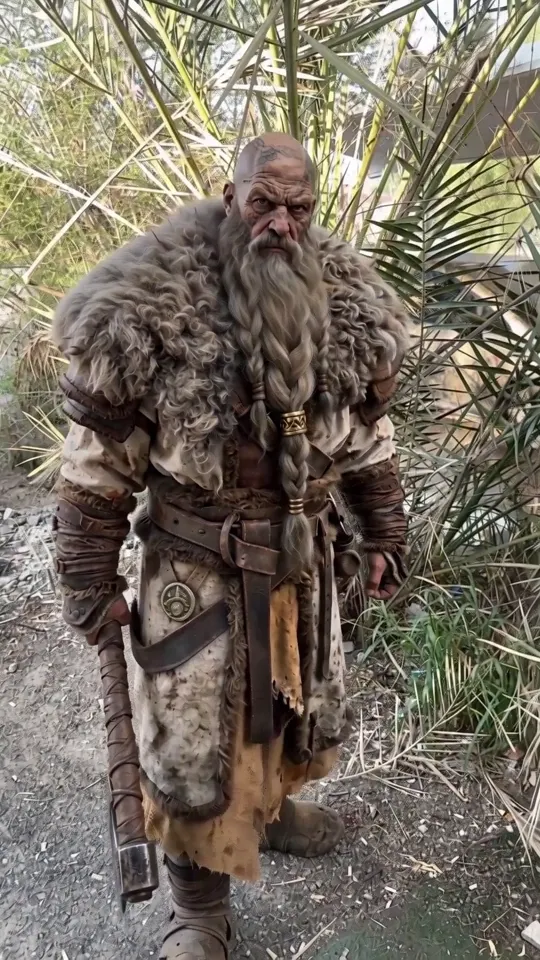
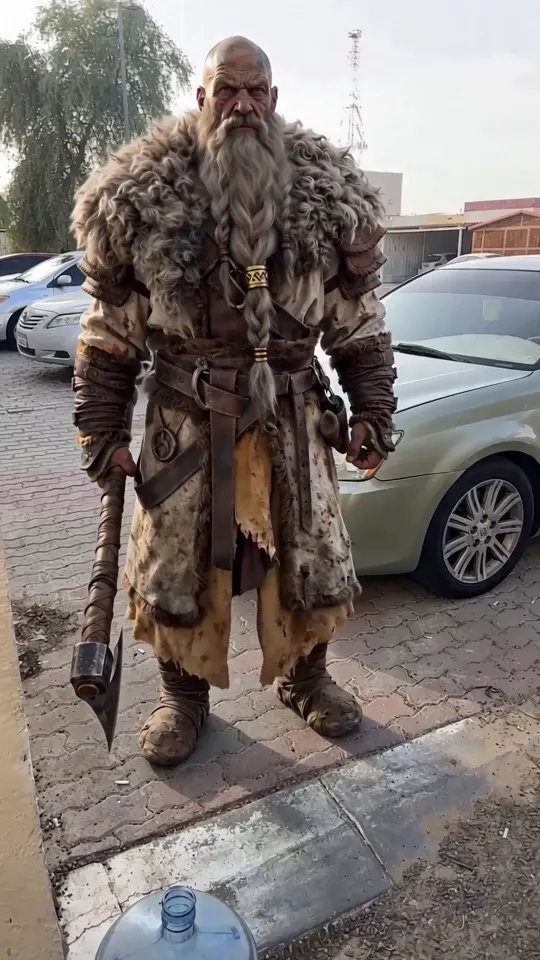
That is how HAJFLIX made "The Viking who sells water" in a real car park, with no costume, no set and no actors. The video reached 46,500 views and 1,482 likes in under 22 hours on TikTok.
How is AI augmented reality different from a normal filter?
Snapchat and Instagram filters draw a digital layer straight on top of the camera: a cartoon face, glasses, or a fixed object that moves with the phone. They are fast and live, but the object usually looks pasted on top of the picture, not part of it.
AI augmented reality works differently:
- Placement: you set the character's position and size in the real place through the phone's camera, and the app tracks the floor and the space.
- Direction: you write a description of the character's action, such as "lifts the water jug and offers it to people walking by".
- Generation: an AI model in the cloud generates the character's movement and blends it with the light, shadows and details of the place.
The result is not a filter over a video but a new video in which the character looks filmed on location. That is what makes viewers stop and ask "is this real?", and that question is what drives engagement.
The tools we use
| Stage | Tools |
|---|---|
| Clean image of the character | Kling AI and Higgsfield, sometimes HeyGen |
| Building the 3D model | Meshy, Tripo and Rodin; each is strongest at something different |
| AR filming | Simulon on iPhone |
| Editing | CapCut, with HyperFrames and Remotion for titles and motion |
| Regeneration (optional) | Seedance, Google Veo and Kling AI |
Worth knowing: Simulon can create 3D models itself, but that is not its strong side. So we build the model outside it on a dedicated platform, import the file, and test how it moves before filming.
The steps: from idea to a finished video in under an hour
- Pick an idea with a contrast. A legend in an everyday situation: a Viking selling water, a witch in a cluttered bedroom, a ghost in a camp. The contrast is what stops the scroll.
- Generate a clean image of the character. Plain background, full body, clear details. The cleaner the image, the more accurate the 3D model.
- Build the 3D model. Turn the image into a model on Meshy, Tripo or Rodin, and keep the best result for that character.
- Import the model into Simulon and test its movement. Try simple actions first to see how the model behaves before you go out to film.
- Choose a real place with acceptable light. Daylight or ordinary room light is enough in most cases. If the light is weak, the video can be regenerated later in another tool, so perfect lighting should not stop you from starting.
- Pin the character. Point the iPhone at the floor and set the character's position and size against things around it: cars, doors, furniture.
- Write the action. The character does not speak in your voice; it behaves according to its training and the production description you write. The clearer and shorter the description, the closer the result, but it is never fully guaranteed. We cover that in detail in the limits of AI AR video.
- Film shots from different places and angles. We filmed the Viking in four places: the garden, the car park, between the cars and by the wall. The whole shoot took under 30 minutes.
- Edit fast. About 20 minutes: cuts, pacing, sound and text.
- Post vertical, 9:16. TikTok and Instagram Reels, with the first two seconds revealing the contrast straight away.
Why did it reach 46,500 views in under a day?
There is no single secret, but these are the three reasons we see behind it:
- The contrast stops the scroll. A huge Viking warrior with an axe and furs, selling water in a car park. It is funny because it is impossible and familiar at the same time.
- The "is this real?" question. The character stands on real ground, with a real shadow, between real cars. Viewers rewatch to check, and every rewatch lifts the video in the algorithm.
- Speed. A simple idea made and posted in under an hour. That speed lets you test many ideas and publish the one that works before everyone else copies it.
Engagement: 1,482 likes from 46,500 views, about 3.2%, in the first 22 hours.
How brands can use it
- Your mascot in a real place: your brand character standing in your shop, restaurant or showroom, welcoming visitors.
- A product at real size: a 3D product on a table or in a room, so customers see its size and shape in a real space.
- Paid ads that stop the scroll: the videos work as paid ads on TikTok, Instagram and other platforms.
- Steady content at low cost: a complete video in under an hour, with no film crew, actors or set.
We offer this as a full service: 3D characters & AR.
FAQ
Do I need 3D software skills?
No. The 3D model is built from an image on platforms such as Meshy, Tripo and Rodin, and placement and filming happen on the phone.
Does Simulon work on Android?
We currently use it on iPhone.
How long does one video take?
Under an hour for a single clip: under 30 minutes to film in AR and about 20 minutes to edit.
Can these videos be used in paid ads?
Yes. They can run as paid ads on TikTok, Instagram and other platforms.
Can you control exactly what the character does?
Only partly. You write the action, but the model decides the final movement. For tighter control we regenerate the shot in tools such as Seedance, Google Veo and Kling AI, as explained in the next note.